Enhancing Education with Google Classroom
Google Classroom is a free web-based learning management system developed by Google. The education platform is designed for use in K–12 and higher education, supporting communication, collaboration, and assignment management between teachers and students. It provides tools to simplify the distribution and collection of classwork while maintaining an organized learning environment.
Top Recommended Alternative

A central hub for communication and collaboration
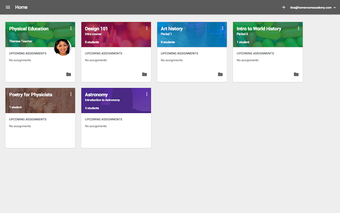
Google Classroom enhances interaction by providing a centralized space that supports communication between teachers and students. Teachers can share announcements, assignments, and questions with the entire class, while students are able to submit their work and, when enabled, add comments.
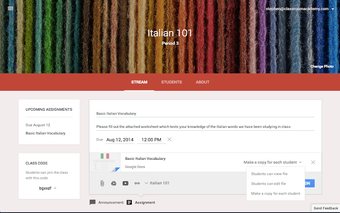
The Stream section organizes class-related updates in one place, making it easier for both teachers and learners to stay informed and connected. However, it does not include built-in video calls or advanced discussion boards. Teachers often need to use other Google apps, like Meet, for these features.
Streamlined assignment management
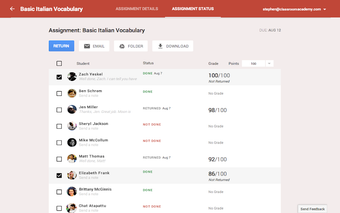
The Classwork tab provides an organized view of assignments and class materials. Within this section, teachers can create and distribute assignments, monitor due dates, and provide feedback on student submissions. Students can access their work and related resources in a structured layout, helping both teachers and learners manage class activities in one place.
Integration with Google services
Google Classroom integrates with Google Drive and other Google tools such as Docs, Sheets, and Slides. This allows teachers to create and share assignments directly from their Drive accounts. Students can attach files from Drive when turning in their work, which reduces the need for printed materials and supports a more organized digital classroom environment.
Progress tracking tools
Google Classroom provides tools that help teachers and students stay organized with classwork. Teachers can review assignments, check due dates, and see which students have turned in their work. Students have a To-do list that highlights upcoming deadlines, while overdue tasks are marked clearly to show what still needs attention. Together, these features make it easier for everyone to manage responsibilities and keep track of important deadlines.
AI-powered learning and teaching assistance
Google Classroom has recently expanded its educational toolkit with AI-assisted features designed to support both teachers and students. Through integration with Google Gemini for Education, educators can now generate lesson ideas, draft assignment instructions, and create quizzes more efficiently. These AI-powered tools help reduce repetitive administrative work, allowing teachers to focus more on classroom engagement and personalized instruction. Students also benefit from smarter study support and easier access to organized learning materials across Google Workspace applications.
Improved classroom organization and workflow
Recent updates introduced enhancements to assignment handling and classroom organization. Teachers now have more flexible scheduling tools for assignments and announcements, making it easier to prepare lessons in advance. Google Classroom has also improved grading workflows, enabling educators to provide feedback faster with reusable comment banks and clearer rubric integration. Combined with stronger Drive synchronization, these updates create a smoother and more structured digital learning experience for both in-person and remote classrooms.
Better integration
While Google Classroom originally relied on external apps for live communication, newer updates have strengthened integration with Google Meet, making virtual classes more seamless. Teachers can now create and manage meeting links directly within Classroom, helping students join lessons faster without switching platforms repeatedly. In addition, expanded support for third-party educational tools and learning apps allows schools to customize their digital classroom environments with interactive quizzes, plagiarism detection tools, and collaborative learning resources.
Accessibility and cross-device enhancements
Google continues improving Classroom’s accessibility and device compatibility to support a broader range of learners. Recent updates focused on mobile usability improvements, faster loading times, and better support for screen readers and accessibility tools. Students can now manage assignments more smoothly across smartphones, tablets, Chromebooks, and desktop devices, ensuring greater flexibility for learning at home, in classrooms, or on the go. These refinements help maintain a consistent educational experience regardless of device limitations.
A continually evolving platform
Google Classroom remains one of the most accessible and widely adopted learning management platforms thanks to its combination of simplicity, collaboration tools, and deep Google Workspace integration. Ongoing updates centered on AI assistance, assignment management, accessibility, and virtual learning continue to improve the overall experience for teachers and students alike. Although advanced communication features still depend partly on companion Google services, Classroom continues to provide a dependable and organized environment that supports modern education across schools, universities, and remote learning setups.
A modern platform for learning
Google Classroom brings teachers and students together in a single, organized space. It helps with sharing announcements, giving out assignments, and keeping track of deadlines, all while using familiar Google tools. Whether used in K–12 or higher education, the platform helps classrooms stay connected and focused, making everyday teaching and learning simpler, more collaborative, and more efficient.